Bypassing MEO's XGS-PON ONT with the WAS-110
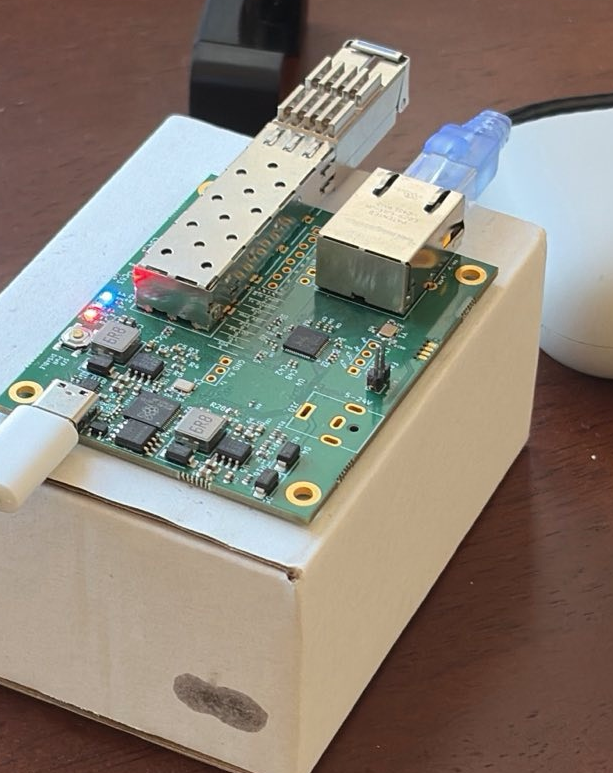
If there’s one thing I like, it’s having control over the edge network, thanks to the 8311 Project bypassing your ISPs ONT with the WAS-110 is pretty easy, however, not all OLTs (PTIN in my case) support changing out the provided ONT with a custom device such as the WAS-110.
Massive thank you to djGrrr (WAS-110 Firmware Maintainer) - the late nights helping me troubleshooting this as well as discussions around hooking methods.
Obtain an OMCI Log
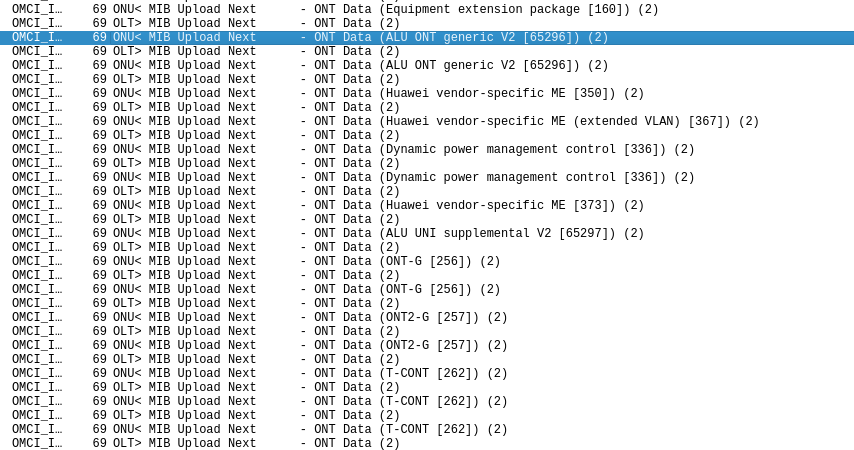
First order of business is obtaining an OMCI Log, this allows you to ‘sniff’ exactly how the OLT is configuring the ONT.
MEO provide the “Fiber Gateway” for their G-PON and XGS-PON services, this is the device we’re attempting to replace.
While I can’t go into specifics, I managed to pull an OMCI Log from my live “FGW” ONT, armed with exactly what the OLT sets up and how the ONT responds, we can configure the WAS-110 to act like original ONT.
Reboot’in
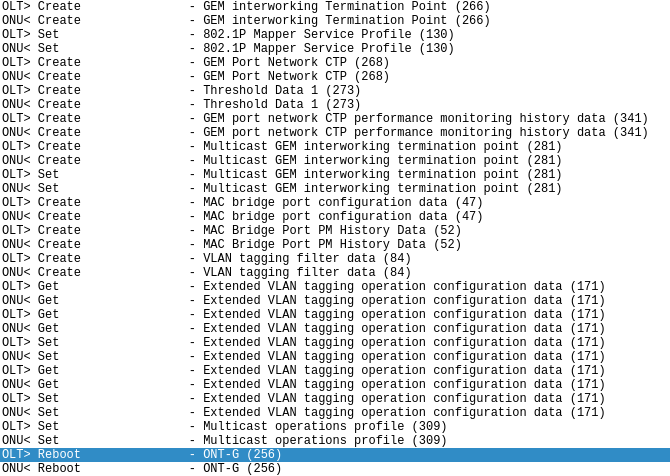
After setting everything I can to match the stock OMCI log, the OLT gives me VLAN 12 (widely known correct internet VLAN for MEO), the OLT then immedately issues a reboot command at the WAS-110, causing the device to reset, this usually happens if the OLT is aware something is off, it’s detected the device is not a stock ONT.
We’re missing the following MIBs:
- 350 (Huawei vendor-specific ME)
- 367 (Huawei vendor-specific ME Extended VLAN)
- 373 (Huawei vendor-specific ME)
- 65296 (ALU ONT generic V2)
- 65297 (ALU UNI supplimental V2)
We’re also missing IPv6 Host Config Data MIBs, more on this later.
In order to understand what these MIBs are for and what their attributes are, I reverse engineered omcid on the stock ONT and added them to Wireshark’s OMCI LUA Script.
Implementing custom MIBs with LD_PRELOAD Hooks
There are a number of Vendor Specific MIBs that the stock ONT sends to the OLT, missing any one of these could tip the OLT off that the original ONT has been replaced.
We need a way to replace out MIBs that are sent to the OLT, the daemon responsible for communication with the OLT over OMCI is omcid, this is a pretty large and complex daemon with a number of external libs
Dynamic section at offset 0x1c0 contains 36 entries:
  Tag        Type                         Name/Value
 0x00000001 (NEEDED)                     Shared library: [libcli.so.1]
 0x00000001 (NEEDED)                     Shared library: [libuci.so]
 0x00000001 (NEEDED)                     Shared library: [libubus.so.20210603]
 0x00000001 (NEEDED)                     Shared library: [libcrypto.so.1.1]
 0x00000001 (NEEDED)                     Shared library: [libifxos.so.0]
 0x00000001 (NEEDED)                     Shared library: [libadapter.so.0]
 0x00000001 (NEEDED)                     Shared library: [libsafec-3.3.so.3]
 0x00000001 (NEEDED)                     Shared library: [libargp-shared.so.0]
 0x00000001 (NEEDED)                     Shared library: [libgcc_s.so.1]
 0x00000001 (NEEDED)                     Shared library: [libc.so]
With LD_PRELOAD we’re able to hook any exported functions inside of the above libs
TX Hooking
Enter _memcpy_s_chk
Ah yes, memcpy but “secure”
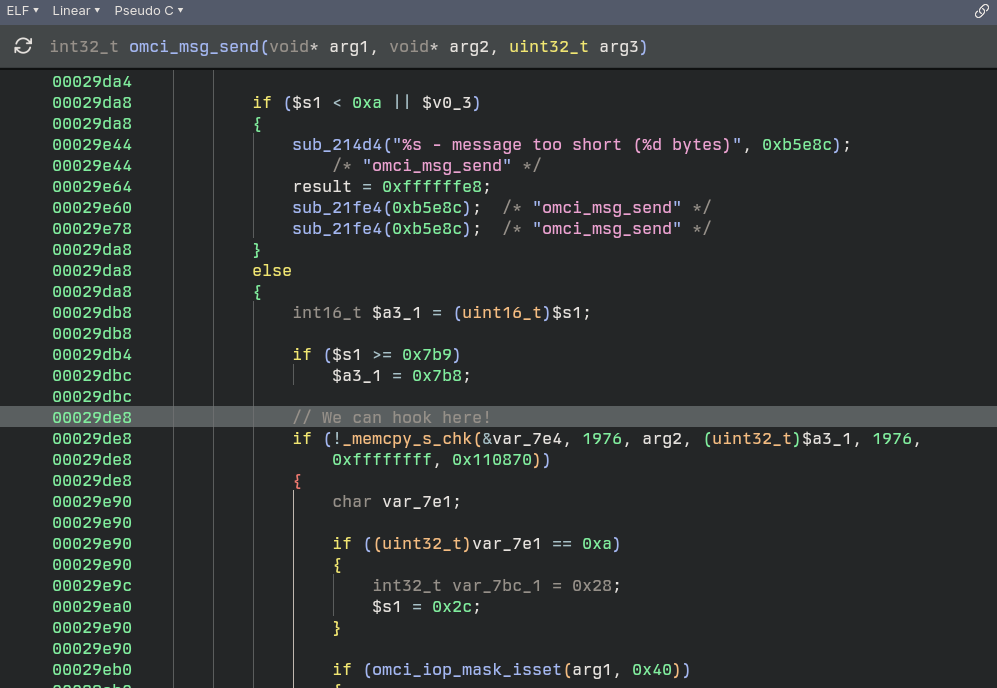
What makes this particular instance of _memcpy_s_chk great is the size, 1976 bytes, it’s the only occurance with this specific size, and it’s called just before CRC Calculations are added and it’s shipped off to the OLT.
Hooking here allows us to swap out any OMCI Message, MIB GET NEXTs, GETs, GET NEXTs that are being sent to the OLT, this means we can define an ini that finds and replaces OMCI Messages to be sent to the OLT.
The source for my hook can be found on Github
Note: Using this hook comes with no warranty and I’m not responsible if you bring down your OLT/cause any damage with it!
This hook is all that was required to get the WAS-110 registering and working with MEO’s PTIN OLT, however we can go further and implement a hook to parse and handle OMCI messages from the OLT, this can be useful to ignore specific messages from the OLT or change incoming messages, for example Port Indexes that the WAS-110 may not support (0 indexed as opposed to 1 etc).
Aside from that this can act as sort of a ‘firewall’ from the OLT.
Update: I’ve added RX Hooking and Wildcard Matching!
RX Hooking
The lib libifxos.so has the function IFX_Fifo_readElement, this function is called from msg_fifo_get
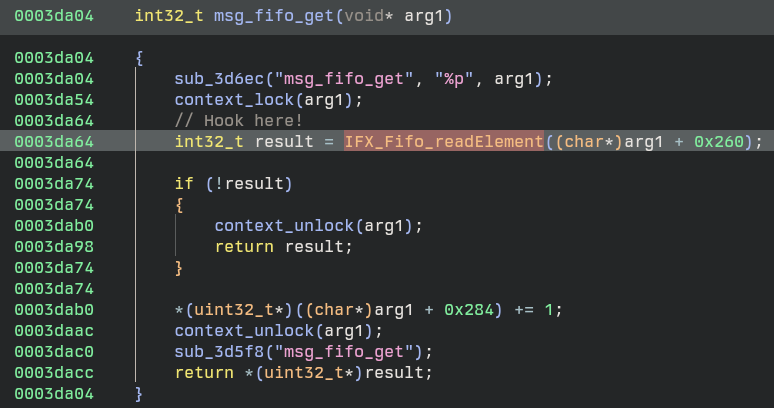
msg_fifo_get is called to get messages from OMCI, then on to a OMCI Message Handler, the handler itself was originally what I wanted to hook however getting Frida working on this target seemed hellish and I gave up after a day.
To use RX hooking simply use the R at replacements.ini
We can hook, now what?
You’ll see in my hook we read a config ini file called /ptconf/8311/replacements.ini
This file has a layout like this:
# OMCI Message Replacement Rules
# Format: <R|T> <message_type> <find_hex_pattern> <replace_hex_pattern>
#
# Direction:
#   R = receive  (OLT -> ONU request,  AR bit set in type byte)
#   T = transmit (ONU -> OLT response, AK bit set in type byte)
#
# Notes:
# - Patterns are matched starting at offset 4 in the OMCI message — the
#   class_id field. The first 4 pattern bytes therefore cover the ME header
#   (class_id high, class_id low, instance_id high, instance_id low),
#   followed by up to 32 payload bytes — typically 36 bytes / 72 hex chars.
# - find and replace must be the same length
# - Hex values should be continuous without spaces
# - Comments start with # or ;
# - Empty lines are ignored
# - "??" is a wildcard byte. In `find` it matches any incoming byte;
#   in `replace` it leaves the destination byte unchanged. Useful for
#   blanket rules (e.g. "set the result code to 00 on every SET response
#   regardless of class/instance/current value").
#
# Wildcard example — force every SET response to result OK:
# T 8 ?????????? ????????00
#
# Example (replace a MIB_UPLOAD_NEXT response on the TX path):
# T 14 00f0000080000000....(72 chars) 015b0002c0000000....(72 chars)
#
# Example (rewrite an incoming GET request on the RX path):
# R 9 00ab0001....(72 chars) 00ab0001....(72 chars)
#
# Message Types:
#  4 = CREATE
#  6 = DELETE
#  8 = SET
#  9 = GET
# 11 = GET_ALL_ALARMS
# 12 = GET_ALL_ALARMS_NEXT
# 13 = MIB_UPLOAD
# 14 = MIB_UPLOAD_NEXT (most common for MIB replacement)
# 15 = MIB_RESET
# 16 = ALARM
# 17 = AVC
# 18 = TEST
# 19 = START_SW_DOWNLOAD
# 20 = DOWNLOAD_SECTION
# 21 = END_SW_DOWNLOAD
# 22 = ACTIVATE_SOFTWARE
# 23 = COMMIT_SOFTWARE
# 24 = SYNC_TIME
# 25 = REBOOT
# 26 = GET_NEXT
# 27 = TEST_RESULT
# 28 = GET_CURRENT_DATA
# 29 = SET_TABLE
As we can see this is a pretty powerful tool, it allows us to directly find/replace 32 bytes of anything sent over OMCI. We can simply lift exactly what we’re wanting to replace with good values from the valid OMCI log - all under omcid’s nose.
Adding new Vendor-Specific MIBs is also pretty easy, the WAS-110 supports some “Dummy” Vendor Specific MIBs, namely 240, 241, 243 …
What we can do is add these supported dummy MIBs, and replace them out with our hook, making sure the Instance ID changes so that we can find the correct instance to find and replace.
# layout:
# <class id> <instance id> <attribute 1> ... <attribute 16>\n
# ....

# conventions:
# - \s is used to place a space (ASCII 0x20)
# - \0 is used to place ASCII 0
# - enclose "a b c" in quotes (either single or double) to interpret it as one
# attribute
#
# numbers radix defined by prefix (0x for 16; 0 for 8; nothing for 10)

#
# Basic list of MEs for OMCI start-up
#

# ONU-G
256 0 "PTIN" "3NTRGW3290r029" 00000000 2 0 0 0 0 #0

# ONU2-G
257 0 "XSR151DK" 0xa0 0 1 1 128 8 1 128 0 0x007f 0 0 10

# ONU data
2 0 0

# ONU dynamic power management control
336 0 0x7 0x0 0 0 0 0 0 0x0000000000000000

## Software image
7 0
7 1

# IPv6 - Will be replaced by hook
240 0
240 1
240 2
240 3
240 4
240 5
240 6
240 7
240 8

# Will be replaced - Vendor Specific MIBs
240 9
240 10
240 11
240 12
240 13
240 14
240 16
240 17
240 18
240 19
240 20
...
Now in our replacements.ini we can simply define the above new Dummy MIBs and what we want to replace them with.
# MIBs — MIB_UPLOAD_NEXT carries embedded ME reports under ONU-Data
# (OMCI header class 0x0002, instance 0x0000). The embedded ME report
# begins at byte 4 of the rule pattern (offset 8 of the message).

# Vendor Specific MIBs - Huawei Vendor Specific MEs/ALU etc & IPv6 Host Config Data
T 14 0002000000f0000080000000000000000000000000000000000000000000000000000000 00020000015b0002c00000c870deadcafe00000000000000000000000000000000000000
T 14 0002000000f0000180000000000000000000000000000000000000000000000000000000 00020000015b000220000000000000000000000000000000000000000000000000000000
T 14 0002000000f0000280000000000000000000000000000000000000000000000000000000 00020000015b000210000000000000000000000000000000000000000000000000000000
T 14 0002000000f0000380000000000000000000000000000000000000000000000000000000 00020000015b000208000000000000000000000000000000000000000000000000000000
T 14 0002000000f0000480000000000000000000000000000000000000000000000000000000 00020000015b000204000000000000000000000000000000000000000000000000000000
T 14 0002000000f0000580000000000000000000000000000000000000000000000000000000 00020000015b000202000000000000000000000000000000000000000000000000000000
T 14 0002000000f0000680000000000000000000000000000000000000000000000000000000 00020000015b000201000000000000000000000000000000000000000000000000000000
T 14 0002000000f0000780000000000000000000000000000000000000000000000000000000 00020000015b000200100000000000000000000000000000000000000000000000000000
T 14 0002000000f0000880000000000000000000000000000000000000000000000000000000 00020000015b0002000a0000000000000000000000000000000000000000000000000000
T 14 0002000000f0000980000000000000000000000000000000000000000000000000000000 00020000015e0000fff001020102000012c0000000000000000000000000000000000000
T 14 0002000000f0000a80000000000000000000000000000000000000000000000000000000 00020000016f0000ffff0000000000000000000000000000000000000000000000000000
T 14 0002000000f0000b80000000000000000000000000000000000000000000000000000000 0002000001750000c0000001000000000000000000000000000000000000000000000000
T 14 0002000000f0000c80000000000000000000000000000000000000000000000000000000 00020000ff100000ff800100000000000000004000100001000000000000000000000000
T 14 0002000000f0000d80000000000000000000000000000000000000000000000000000000 00020000ff10000000400000000000000000000000000000000000000000000000000000
T 14 0002000000f0000e80000000000000000000000000000000000000000000000000000000 00020000ff110101fe000000000000000000000000000000000000000000000000000000
T 14 0002000000f0001080000000000000000000000000000000000000000000000000000000 0002000000520301f8000101000000000000000000000000000000000000000000000000
T 14 0002000000f0001180000000000000000000000000000000000000000000000000000000 00020000005a0000ffff000100000300071e000000000000000000a11900000000000000
T 14 0002000000f0001280000000000000000000000000000000000000000000000000000000 0002000001080101ffff000100000300071e000000000000000000a11900000000000000
T 14 0002000000f0001380000000000000000000000000000000000000000000000000000000 0002000001500000ff00040007d007d00000000000000000000000000000000000000000
T 14 0002000000f0001480000000000000000000000000000000000000000000000000000000 000200000150000000f00000000000000000000000000004000000000000000000000000
T 14 0002000000070001f00056302e3031000000000000000000000001000000000000000000 0002000000070001f0000000000000000000000000000000000001000000000000000000

# IPv4 Host Config Data
T 14 0002000000860001c0000000000000000000000000000000000000000000000000000000 0002000000860001c00000c870deadcafe00000000000000000000000000000000000000
T 14 000200000086000100780000000000000000000000000000000000000000000000000000 00020000008600010078006e58e400000001000000010000000000000000000000000000
T 14 000200000086000100020000000000000000000000000000000000000000000000000000 00020000008600010002c7abf63f000000010000003f0000000000000081080000d0d900
T 14 000200000086000100040000000000000000000000000000000000000000000000000000 000200000086000100040000000000000000000000000000000084a06e0077000000a800
T 14 000200000086000100020000000000000000000000000000000000000000000000000000 0002000000860001000247d9f63f000000010000003f0000000000000081080000703600
T 14 00020000010000001f800000000000000000000000000000000000000000000000000000 00020000010000001f800100000000000000000000000000000000000000000000000000

# All SETs and CREATEs return OK always

T 8 ?????????? ????????00
T 4 ?????????? ????????00
Note: Replaced my MAC Address with c870DEADCAFE
In the case of MEO (and possibly other ISPs using a PTIN OLT), the above was required for the OLT to accept the WAS-110, there appears to be some interesting data in the IPv6 Hostname, this could be some extra authentication that PTIN uses to identify it’s ONTs, I’m not quite sure but the combination above resulted in success!
With an SFP Media Buddy, we can see output from the hook here
[HOOK] OMCI buffer detected! (1976 bytes) n=40
[HOOK] Loading replacement rules...
[OMCI] Loading replacement rules from /ptconf/8311/replacements.ini
[OMCI] Rule 1: MT=9 (GET), pattern_len=32 bytes
[OMCI] Rule 2: MT=26 (GET_NEXT), pattern_len=32 bytes
[OMCI] Rule 3: MT=26 (GET_NEXT), pattern_len=32 bytes
[OMCI] Rule 4: MT=26 (GET_NEXT), pattern_len=32 bytes
[OMCI] Rule 5: MT=26 (GET_NEXT), pattern_len=32 bytes
[OMCI] Rule 6: MT=26 (GET_NEXT), pattern_len=32 bytes
[OMCI] Rule 7: MT=26 (GET_NEXT), pattern_len=32 bytes
[OMCI] Rule 8: MT=26 (GET_NEXT), pattern_len=32 bytes
[OMCI] Rule 9: MT=26 (GET_NEXT), pattern_len=32 bytes
[OMCI] Rule 10: MT=26 (GET_NEXT), pattern_len=32 bytes
[OMCI] Rule 11: MT=26 (GET_NEXT), pattern_len=32 bytes
[OMCI] Rule 12: MT=9 (GET), sequence=1 (ME 0x00ab auto-replace)
[OMCI] Rule 13: MT=9 (GET), sequence=2 (ME 0x00ab auto-replace)
[OMCI] Rule 14: MT=9 (GET), sequence=3 (ME 0x00ab auto-replace)
[OMCI] Rule 15: MT=14 (MIB_UPLOAD_NEXT), pattern_len=32 bytes
[OMCI] Rule 16: MT=14 (MIB_UPLOAD_NEXT), pattern_len=32 bytes
[OMCI] Rule 17: MT=14 (MIB_UPLOAD_NEXT), pattern_len=32 bytes
[OMCI] Rule 18: MT=14 (MIB_UPLOAD_NEXT), pattern_len=32 bytes
[OMCI] Rule 19: MT=14 (MIB_UPLOAD_NEXT), pattern_len=32 bytes
[OMCI] Rule 20: MT=14 (MIB_UPLOAD_NEXT), pattern_len=32 bytes
[OMCI] Rule 21: MT=14 (MIB_UPLOAD_NEXT), pattern_len=32 bytes
[OMCI] Rule 22: MT=14 (MIB_UPLOAD_NEXT), pattern_len=32 bytes
[OMCI] Rule 23: MT=14 (MIB_UPLOAD_NEXT), pattern_len=32 bytes
[OMCI] Rule 24: MT=14 (MIB_UPLOAD_NEXT), pattern_len=32 bytes
[OMCI] Rule 25: MT=14 (MIB_UPLOAD_NEXT), pattern_len=32 bytes
[OMCI] Rule 26: MT=14 (MIB_UPLOAD_NEXT), pattern_len=32 bytes
[OMCI] Rule 27: MT=14 (MIB_UPLOAD_NEXT), pattern_len=32 bytes
[OMCI] Rule 28: MT=14 (MIB_UPLOAD_NEXT), pattern_len=32 bytes
[OMCI] Rule 29: MT=14 (MIB_UPLOAD_NEXT), pattern_len=32 bytes
[OMCI] Rule 30: MT=14 (MIB_UPLOAD_NEXT), pattern_len=32 bytes
[OMCI] Rule 31: MT=14 (MIB_UPLOAD_NEXT), pattern_len=32 bytes
[OMCI] Rule 32: MT=14 (MIB_UPLOAD_NEXT), pattern_len=32 bytes
[OMCI] Rule 33: MT=14 (MIB_UPLOAD_NEXT), pattern_len=32 bytes
[OMCI] Rule 34: MT=14 (MIB_UPLOAD_NEXT), pattern_len=32 bytes
[OMCI] Rule 35: MT=14 (MIB_UPLOAD_NEXT), pattern_len=32 bytes
[OMCI] Rule 36: MT=14 (MIB_UPLOAD_NEXT), pattern_len=32 bytes
[OMCI] Rule 37: MT=14 (MIB_UPLOAD_NEXT), pattern_len=32 bytes
[OMCI] Rule 38: MT=14 (MIB_UPLOAD_NEXT), pattern_len=32 bytes
[OMCI] Rule 39: MT=14 (MIB_UPLOAD_NEXT), pattern_len=32 bytes
[OMCI] Rule 40: MT=14 (MIB_UPLOAD_NEXT), pattern_len=32 bytes
[OMCI] Rule 41: MT=14 (MIB_UPLOAD_NEXT), pattern_len=32 bytes
[OMCI] Rule 42: MT=4 (CREATE), pattern_len=32 bytes
[OMCI] Loaded 42 replacement rules
[OMCI] Rule 0: MT=9, len=32, find=[00 80 00 00 00 00 fc 00 ...]
[OMCI] Rule 1: MT=26, len=32, find=[00 80 00 00 02 00 05 00 ...]
[OMCI] Rule 2: MT=26, len=32, find=[00 80 00 35 00 3a 00 4e ...]
[OMCI] Rule 3: MT=26, len=32, find=[00 80 00 00 8a 00 8b 00 ...]
[OMCI] Rule 4: MT=26, len=32, find=[00 80 00 99 00 9d 00 9e ...]
[OMCI] Rule 5: MT=26, len=32, find=[00 80 00 00 fa 00 fb 00 ...]
[OMCI] Rule 6: MT=26, len=32, find=[00 80 00 10 01 11 01 12 ...]
[OMCI] Rule 7: MT=26, len=32, find=[00 80 00 01 2b 01 2c 01 ...]
[OMCI] Rule 8: MT=26, len=32, find=[00 00 00 00 00 00 00 00 ...]
[OMCI] Rule 9: MT=26, len=32, find=[00 00 00 00 00 00 00 00 ...]
[OMCI] Rule 10: MT=26, len=32, find=[00 00 00 00 00 00 00 00 ...]
[OMCI] Rule 11: MT=9, len=0, find=[...]
[OMCI] Rule 12: MT=9, len=0, find=[...]
[OMCI] Rule 13: MT=9, len=0, find=[...]
[OMCI] Rule 14: MT=14, len=32, find=[00 f0 00 00 80 00 00 00 ...]
[OMCI] Rule 15: MT=14, len=32, find=[00 f0 00 01 80 00 00 00 ...]
[OMCI] Rule 16: MT=14, len=32, find=[00 f0 00 02 80 00 00 00 ...]
[OMCI] Rule 17: MT=14, len=32, find=[00 f0 00 03 80 00 00 00 ...]
[OMCI] Rule 18: MT=14, len=32, find=[00 f0 00 04 80 00 00 00 ...]
[OMCI] Rule 19: MT=14, len=32, find=[00 f0 00 05 80 00 00 00 ...]
[OMCI] Rule 20: MT=14, len=32, find=[00 f0 00 06 80 00 00 00 ...]
...
[HOOK] Attempting to apply 42 rules...
[  262.343100] sw2: port 2(pmapper5) entered blocking state
[  262.347045] sw2: port 2(pmapper5) entered disabled state
[  262.353593] device pmapper5 entered promiscuous mode
[  262.357559] sw2: port 2(pmapper5) entered blocking state
[  262.362567] sw2: port 2(pmapper5) entered forwarding state
[HOOK] OMCI buffer detected! (1976 bytes) n=40
[HOOK] Attempting to apply 42 rules...
[HOOK] OMCI buffer detected! (1976 bytes) n=40
[HOOK] Attempting to apply 42 rules...
[HOOK] OMCI buffer detected! (1976 bytes) n=40
[HOOK] Attempting to apply 42 rules...
[HOOK] OMCI buffer detected! (1976 bytes) n=40
[HOOK] Attempting to apply 42 rules...
[HOOK] OMCI buffer detected! (1976 bytes) n=40
[HOOK] Attempting to apply 42 rules...
[HOOK] OMCI buffer detected! (1976 bytes) n=40
[HOOK] Attempting to apply 42 rules...
[  263.012303] sw-multicast: port 1(gem29) entered blocking state
[  263.016851] sw-multicast: port 1(gem29) entered disabled state
[  263.023759] device gem29 entered promiscuous mode
[  263.093995] sw-multicast: port 1(gem29) entered blocking state
[  263.098538] sw-multicast: port 1(gem29) entered forwarding state
[  263.193284] sw-multicast: port 2(eth0_0_2) entered blocking state
[  263.198095] sw-multicast: port 2(eth0_0_2) entered disabled state
[  263.205154] device eth0_0_2 entered promiscuous mode
[  263.287125] sw-multicast: port 2(eth0_0_2) entered blocking state
[  263.291864] sw-multicast: port 2(eth0_0_2) entered forwarding state
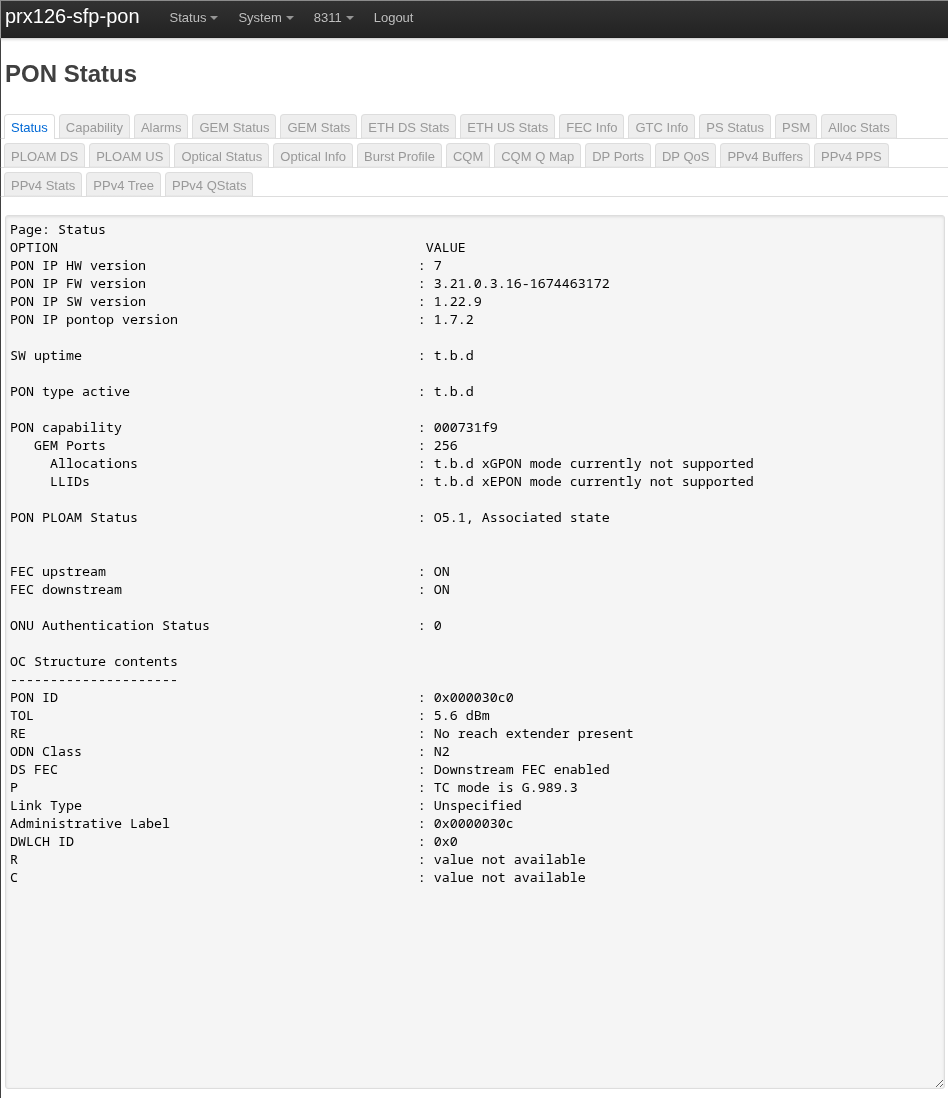
At this point I’m at O5 state and receiving a public IPv4 address from MEO’s DHCP Server and a valid /56 from their DHCPv6 Server!
Extended VLAN table 3
------------------------
Filter Outer    Filter Inner    Filter Other  Treatment Outer     Treatment Inner
Prio  VID TPIDDEI Prio  VID TPIDDEI EthTyp  ExtCrit TagRem  Prio  VID TPIDDEI Prio  VID TPIDDEI
15  4096  0 8 12  0 0 0 1 15  4097  1 8 12  4
15  4096  0 15  4096  0 0 0 0 15  0 0 15  0 0
15  4096  0 14  4096  0 0 0 0 15  0 0 15  0 0
14  4096  0 14  4096  0 0 0 0 15  0 0 15  0 0
Extended VLAN table 4
------------------------
Filter Outer    Filter Inner    Filter Other  Treatment Outer     Treatment Inner
Prio  VID TPIDDEI Prio  VID TPIDDEI EthTyp  ExtCrit TagRem  Prio  VID TPIDDEI Prio  VID TPIDDEI

15  4096  0 15  4096  0 0 0 0 15  0 0 15  0 0
15  4096  0 14  4096  0 0 0 0 15  0 0 15  0 0
14  4096  0 14  4096  0 0 0 0 15  0 0 15  0 0


Extended VLAN table 3
------------------------
Filter Outer Priority:    15  (Not a double-tag rule; ignore all other outer tag filter fields)
Filter Outer VID:   4096  (Do not filter on the outer VID)
Filter Outer TPID/DEI:    0 (Do not filter on outer TPID or DEI)
Filter Inner Priority:    8 (Do not filter on the inner priority)
Filter Inner VID:   12
Filter Inner TPID/DEI:    0 (Do not filter on inner TPID or DEI)
Filter EtherType:   0 (Do not filter on EtherType)
Filter Extended Criteria: 0 (Do not filter on extended criteria)
Treatment tags to remove: 1
Treatment outer priority: 15  (Do not add an outer tag)
Treatment outer VID:    4097  (Copy from the outer VID of received frame)
Treatment outer TPID/DEI: 1 (TPID = Outer TPID, DEI = Outer DEI)
Treatment inner priority: 8 (Copy from the inner priority of received frame)
Treatment inner VID:    12
Treatment inner TPID/DEI: 4 (TPID = 0x8100)

...
While this worked… It only worked for ~900 packets before the link would drop, if I changed my VLAN PRI (Upstream GEM Port) - I would get a further ~900 packets.
To fix this issue, thanks to djGrrr:
GEMS=$(ip -o li list | pcre2grep -o1 '^\d+:\s+(gem\d+)')
for gem in $GEMS; do tc filter del dev $gem egress; tc filter del dev $gem ingress; done
Adding the above script to ISP Fixes, totally allow think link to function normally!
I should figure out exactly what Priority Queue rule is breaking this, however with the above everything is working just fine.
Other possible use-cases
This hook could possibly used to fuzz OLTs, I don’t condone that, but one technically could, given you have no idea what firmware is running on the other end of the fiber.